How to Spot Fake Reviews on Amazon Before You Buy
You find a $20 gadget with 4.8 stars and a few thousand reviews. It looks like a safe bet. Then it arrives, feels flimsy, and quits in two weeks.
If you’re shopping on a budget, a bad buy hurts more because you can’t just shrug and replace it. Learning how to spot fake reviews on Amazon before you buy is one of the cheapest ways to protect your money.
This guide covers the checks you can do in about five minutes, the Amazon features worth using, and what to do about third-party review checkers, since several have shut down. It’s based on official sources, product documentation, and widely reported user feedback, not lab testing.
Quick picks: the best ways to check Amazon reviews
| Pick | Best for | Key feature |
|---|---|---|
| The 5-minute manual review audit | Everyone | Works on any listing, no tools needed |
| Amazon’s built-in review features | Quick first pass | Verified Purchase tag, filters, “Customers say” summary |
| Keepa (price and listing history) | Spotting suspicious listing changes | Historical charts for a product page |
| Third-party review checkers | A second opinion only | Adjusted ratings (when the tool works) |
How we picked these methods
We looked for checks that meet four standards:
- Free or nearly free. This is written for shoppers on a budget.
- Still working. Tools that have shut down are covered separately so you don’t waste time on them.
- Based on how fake reviews actually work. That means paid reviews, review swaps, and recycled listings, not guesswork.
- Honest about limits. No method catches everything, and we say where each one falls short.
What fake Amazon reviews usually look like
Fake reviews aren’t always obvious. Some are lazy and repetitive. Others are detailed and sound convincing. These are the common patterns:
- Paid or incentivized reviews. The seller offers a refund, gift card, or free product in exchange for five stars.
- Review hijacking. A seller takes over an old, well-reviewed listing and swaps in a different product. The old reviews stay.
- Brushing. A seller ships cheap items to random addresses, then posts “verified purchase” reviews from those accounts.
- AI-generated reviews. These tend to be polished and generic, with no real detail about using the product. For a deeper look, see our sister site’s guide on how to spot AI-generated fake reviews.
The law is also catching up. The FTC issued a final rule banning fake and misleading reviews, including AI-generated ones, and it took effect on October 21, 2024. It lets the agency seek civil penalties. That’s useful context, but enforcement doesn’t clean up every listing, so you still need your own checks.
Method 1: The 5-minute manual audit for fake Amazon reviews
This is the most reliable method because it doesn’t depend on any app that might disappear.
Overview
Instead of reading the top reviews, you test the pattern around them. Fake reviews leave fingerprints: odd timing, vague language, and a rating that doesn’t match the product category.
Key steps
- Read the 3-star and 2-star reviews first. Honest reviewers tend to explain what’s good and what’s bad. Fake five-star reviews rarely mention flaws.
- Look at dates. A pile of reviews posted in the same few days, especially right after the listing went up, deserves suspicion.
- Check whether reviews describe actual use. “Great product, fast shipping, highly recommend” tells you nothing. A real review mentions how it fit, how long the battery lasted, or what broke.
- Watch for repeated phrasing. If several reviews share the same odd wording, they may come from the same source.
- Look for reviews about a different product. If the listing is for a phone case and reviews talk about a lamp, the listing may have been merged or hijacked.
- Open a few reviewer profiles. An account that reviews dozens of unrelated items at a steady pace and gives nearly everything five stars is a red flag, though not proof.
An example (illustrative, not a real review)
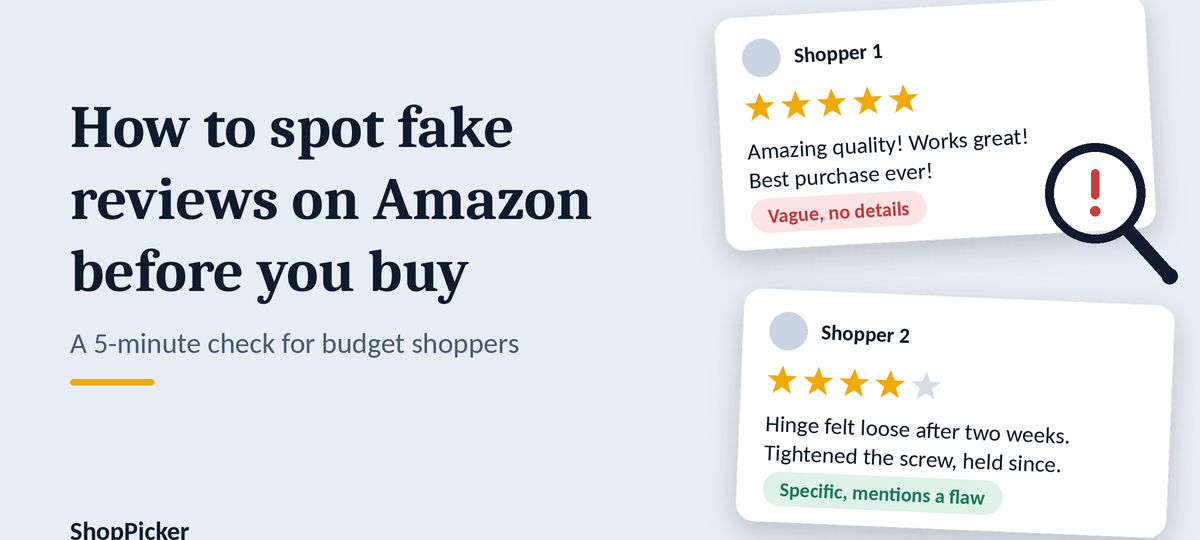
Suspicious: “Amazing quality! Works perfectly! Best purchase ever! Highly recommend to everyone!”
More credible: “Fits my 2019 laptop but the hinge felt loose after two weeks. Tightened it with the included screw and it’s been fine. Wish the cable were longer.”
The second one has specifics, a flaw, and a fix. That’s what real use sounds like.
Pros
- Free and needs no download
- Works on any listing, any category
- Teaches you a skill you keep
Cons
- Takes a few minutes per product
- Takes judgment, and a skilled faker can pass some of these checks
- You can’t see what Amazon has already removed behind the scenes
Who it’s best for
Anyone, especially for purchases over a few dollars. Skip the full audit for very cheap items where the downside is tiny.
Next step
Before your next purchase, open the 2-star and 3-star reviews first and read five of them.
Method 2: Use Amazon’s built-in review features
Overview
Amazon gives you several tools on the product page. They’re useful, but each has blind spots.
Key features
- Verified Purchase tag. It shows the reviewer bought the item through Amazon.
- Star filters and sorting. You can filter by rating and sort by most recent, which helps you spot sudden changes in quality.
- “Customers say” summary. Amazon’s AI-generated summary of review themes can save time, but it can only summarize what reviewers wrote.
- Vine labels. Reviews marked as Vine come from reviewers who received a free product through an Amazon program. They aren’t fake, but they aren’t the same as a paying customer’s experience.
- Report button. You can report a review that looks abusive or fake.
Pros
- Already built in, nothing to install
- Fast first screen of a listing
- Filters make it easy to read critical reviews
Cons
- A Verified Purchase tag is not proof of an honest review. Brushing and refund-for-review schemes can still produce verified reviews.
- A summary of manipulated reviews will reflect that manipulation.
- Amazon’s moderation is not visible to you, so you can’t tell what slipped through.
Who it’s best for
Quick checks on everyday purchases. Don’t rely on it alone for pricier items.
Next step
Sort by “Most recent” and compare the latest reviews to the top ones. A big gap in tone is worth noticing.
Method 3: Check listing and price history with Keepa
Overview
Keepa is a long-running tool that tracks Amazon listing history, including price charts, through a website and browser extension. It doesn’t read review text. What it helps with is spotting listings that have been changed or look unstable.
Key features
- Price history charts for a product
- Price drop alerts
- Charts that may include rating and review count over time (verify what the current version shows before you publish)
CamelCamelCamel is a similar free price tracker. It focuses on price history and alerts, not reviews.
Pros
- Shows whether a “sale” price is actually normal
- A sudden change in listing history can prompt you to look closer
- Useful for budget shopping beyond fake review checks
Cons
- It doesn’t judge whether review text is real
- The charts take a little time to learn
- Some features may need a paid plan (verify current plans before you publish)
Who it’s best for
Budget shoppers who buy higher-priced items and want to see how a listing has behaved over time. Skip it if you only buy small, cheap items.
Next step
Look up the product’s history before buying, especially if the “discount” seems too good.
Method 4: Third-party fake review checkers (use with caution)
Overview
These tools claim to analyze a listing’s reviews and give a reliability score or adjusted rating. They were once a standard first step. Now the field is shaky.
What changed
- Mozilla said it was shutting down Fakespot as part of a shift to focus on Firefox.
- ReviewMeta is described differently depending on the source. One directory reported the site wasn’t loading as of early September 2026, and a separate consumer site reported it worked inconsistently after Fakespot closed. Test it yourself before you recommend it.
- Newer names appear in roundups, including FakeFind, Null Fake, and Savino. We haven’t verified their accuracy or privacy practices.
Pros
- A fast second opinion
- Some show reasoning, such as how many reviews were discounted
Cons
- Scores are estimates, not proof
- Methods are often not published, so you can’t check their logic
- Many tools disappear or stop working, and browser extensions can ask for broad permissions
- Their scores can be wrong in both directions
Who it’s best for
Shoppers who want an extra signal after doing the manual audit. Never use a score as your only evidence.
Next step
If you try one, treat its result as one input and compare it against what you saw in the reviews.
Comparison table: fake review checks at a glance
| Method | Cost | Time needed | What it catches | Main limit |
|---|---|---|---|---|
| Manual 5-minute audit | Free | 3 to 5 minutes | Odd timing, vague language, mismatched reviews | Needs judgment |
| Amazon’s built-in features | Free | 1 to 2 minutes | Quick pattern checks | Verified tag can be gamed |
| Keepa / price trackers | Free tier available (verify) | 1 to 3 minutes | Suspicious listing history, fake discounts | Doesn’t read review text |
| Third-party checkers | Varies | 1 minute | A rough second opinion | Reliability and lifespan vary |
Buying guide: how to avoid getting fooled
Mistakes to avoid
- Trusting the star average. A 4.7 can hide a lot. Look at the spread and the written reviews.
- Treating “Verified Purchase” as a guarantee. It tells you where the item was bought, not whether the review is honest.
- Ignoring the seller. An unfamiliar seller with a brand-new listing deserves more scrutiny than a known brand.
- Skipping the return policy. Check the return terms on the page before you order. If a product turns out to be junk, an easy return protects your budget.
- Believing a perfect score. Real products get a few complaints, so a flawless record with no criticism is itself odd.
How to choose when the reviews are unclear
- Compare the Amazon reviews with sources outside Amazon, such as independent reviewers, manufacturer pages, or discussion forums.
- Look for a brand with a support page and warranty information.
- If you can’t decide, pick the option with more consistent, detailed, critical reviews over the one with the highest score.
Buying a note-taking tablet or other budget gadget? Our best tablets for note-taking under $300 guide shows how to weigh specs and user feedback together, and our best planners and desk organizers for students under $25 is a good place to practice these checks on low-cost items.
What to do if you already bought a product with fake reviews
Check the return window right away. Leave an honest review describing your experience, and use the report button on reviews that look fake.
FAQ: Fake Amazon reviews
How can I tell if Amazon reviews are real?
Read the middle-star reviews, check for specific details about use, and watch for repeated wording or reviews posted in a cluster. No single sign proves a review is fake, but several together are a strong hint.
Can I trust the Verified Purchase badge?
Partly. It means the review came from someone who bought the item through Amazon. It doesn’t prove the review is honest, because some schemes produce verified purchases on purpose.
Is there still a tool that checks Amazon reviews automatically?
Some exist, but the field changes fast. Fakespot closed in 2025 and the status of others is unclear, so use any checker as a second opinion, not a verdict.
Does a product with few reviews mean it’s safer?
Not necessarily. Few reviews means less evidence either way, and a low count can also mean a new or recycled listing. Read the ones that exist and check the seller.
How do I spot fake reviews on Amazon when everything is five stars?
Look for reviews that mention specifics and flaws, check posting dates, and see whether the product description matches what reviewers describe. If the whole page feels too perfect, try independent reviews outside Amazon.
What if reviews mention a different product?
That can point to a hijacked or merged listing. Treat it as a strong warning and look for the same product on a different listing or from a different seller.
Is it illegal to post fake reviews?
In the US, the FTC’s rule bans buying, selling, or writing fake reviews, including AI-generated ones. Check the FTC’s own page for current details on enforcement and penalties.
Why trust ShopPicker
We build our guides from official documentation, specs, and published user feedback, and we say plainly when something is uncertain. We haven’t run lab tests on the tools in this article, and we update guides when tools change.
Final verdict: the best way to spot fake reviews on Amazon before you buy
There’s no single perfect method, so combine two or three.
- Best overall: the 5-minute manual audit. It’s free, works on any product, and doesn’t break when a tool shuts down.
- Best budget pick: Amazon’s built-in features. Filters and sorting cost nothing and take a minute. Use them with the manual audit, not instead of it.
- Best for power users: Keepa. It adds listing history to your checks. We aren’t naming a “premium” pick because none of these tools justifies spending money for everyone, and inventing one would be padding.
If you remember one thing about how to spot fake reviews on Amazon before you buy, make it this: read the middle reviews, look for specifics, and don’t let a star average make the decision for you.